What is the 3D Secure service?
How the service works:
Verification of your details with strong authentication
To complete your transaction, your identity will be verified through strong authentication by entering two codes, as shown in the image below:
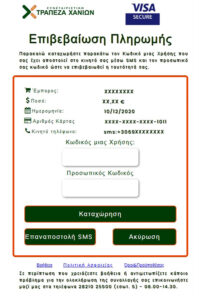
a. A One-Time Password (OTP) code, which you will receive via SMS on the mobile number you have registered with the Chania Cooperative Bank. Enter this code in the corresponding field of the notification within a time limit of three (3) minutes. After three minutes, the code will expire. You have the option to select “Resend SMS” if needed.
b. Your personal code. On your first transaction, you will enter your Tax Identification Number (TIN – ΑΦΜ).
Next, after entering the SMS OTP and your TIN (ΑΦΜ), you will be prompted to change your personal (static) password to one of your choice, on the page that will automatically appear. The personal code you create will be used for your future online transactions.
After your identity has been verified with strong authentication, your payment will be forwarded for approval.
Please note that without your mobile phone, completing your transaction will not be possible.
If, for technical reasons, you are unable to receive the SMS—either because your mobile phone number is incorrect or because you have not provided it to the Bank—you must visit one of our Bank’s branches to update your personal information.
Useful Documents
Do you need help?
Online transactions are now even more secure with the upgraded VISA SECURE & Mastercard Identity Check service (depending on the logo of the card you hold), which ensures the safety of your transactions by reducing the risk of fraud.
The One-Time Password is sent to the mobile phone number you have registered with the Bank, providing you with additional and enhanced security for online transactions.
The personal password adds an extra layer of security to your online transactions. This password is initially your Tax Identification Number (TIN) as registered with the Bank. During your first transaction attempt, you will be prompted to change it and use the new personal password for future transactions. If you wish to keep the same personal password, you must enter your TIN twice, and it will then be saved as your personal password.
To complete an online transaction at a certified online store, your identity must be verified using a One-Time Password (OTP). The OTP is sent to the mobile phone number you have registered with the Bank, and you will need to enter it on the screen that appears—after first confirming the transaction details are correct. If no mobile phone number is registered, you will need to visit a Bank Branch.
You will need to visit a Branch of the Chania Cooperative Bank to update your personal information in accordance with the Bank’s procedures. Without a registered mobile phone number, completing the transaction will not be possible.
No. All cards issued by the Chania Cooperative Bank are automatically enrolled in the service free of charge.
No. You cannot remove your card from the service, as its participation ensures the security of your transactions. The use of Strong Customer Authentication (SCA) is required by regulatory framework for transaction processing.
Certified online stores display the VISA SECURE or Verified by Visa & Mastercard Identity Check or Mastercard Secure Code logos on their website.
Yes, you can, but at your own risk, as the store will not require your authentication through the codes that only you know.